Free Black and White Resume Template
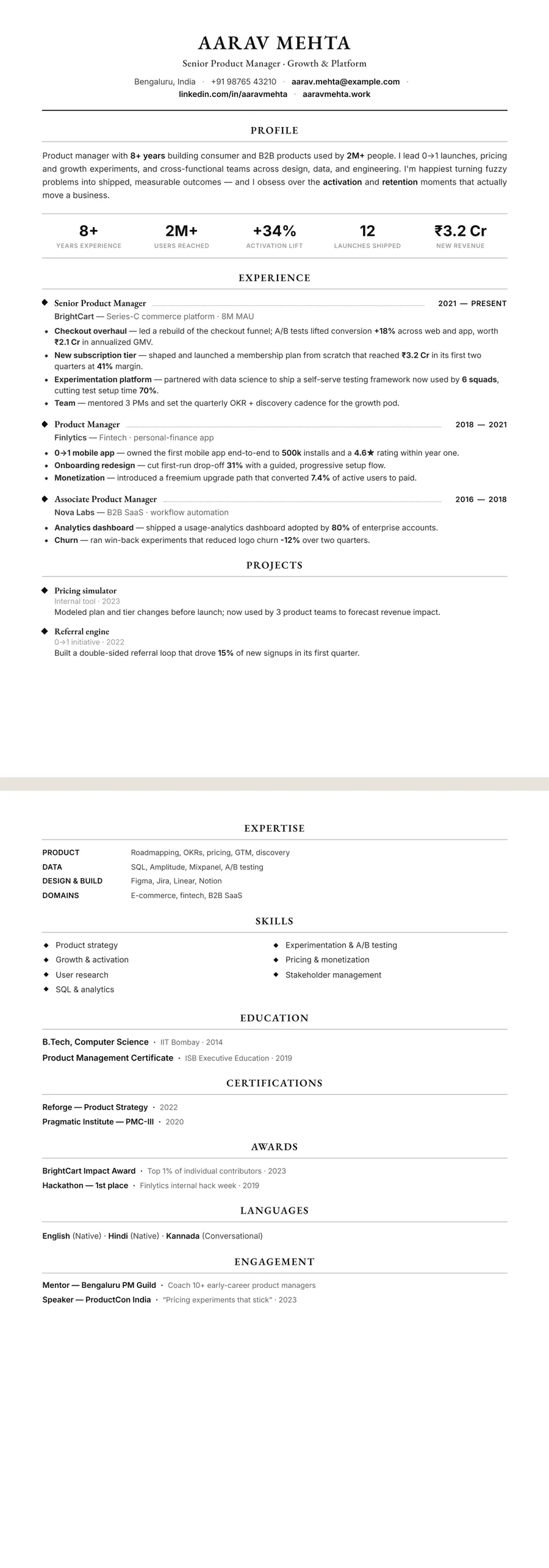
A black and white resume template uses no colour at all: black text, grey rules and white space. That sounds plain, but it solves a practical problem. A resume that will be printed, photocopied, scanned or handed across an interview table looks the same on paper as on screen, with no faded headings or muddy panels. It suits formal applications, walk-in interviews, campus placements, public-sector hard copies and any employer that still works from printed stacks.
Why choose a resume with no colour
Colour can help on screen, but on paper it is fragile. Printers render accents differently, office photocopiers turn pale colours into grey smudges, and a scanned copy can lose light text entirely. A black and white design removes that risk. Hierarchy comes from type instead: a bold name, firm section headings, thin rules and steady spacing.
That gives it a different character from other styles:
- Next to a colour-accent template, it looks identical on every printer and screen.
- Next to a dark sidebar design, it uses far less ink and survives a photocopy.
- Next to a sparse minimalist design, it can still be dense and structured — the restraint is in colour, not content.
The result reads as formal and assured, which suits interviews where the panel works from printed copies.
When a printable resume makes sense
Choose black and white when paper is part of the process:
- Interviews and walk-ins — bring a printed copy for every panel member.
- Campus placements and job fairs — where resumes are collected in a pile and photocopied.
- Government, PSU and public-sector applications that ask for a hard copy with your documents.
- Formal fields — law, audit, banking and senior management.
- Fax or print-and-scan submissions, still used by some clinics, agencies and offices.
It matters less when you apply only online to a design-led company, where a touch of colour can help you stand out. Even then, a monochrome copy is never wrong and makes a good master version to keep. For the same discipline in a centred, serif format, see the traditional resume template.
Black and white and ATS readability
Colour has no effect on how an applicant tracking system reads your resume — the software reads text, not ink. What matters is structure, and black and white designs tend to be simple, which helps.
A few points are still worth checking. Pale grey text for dates or locations can become hard to read once printed and photocopied, so keep secondary text dark. Rules and dividers are fine; they are drawn lines, not text. And if a paper copy might be scanned back into a system, clear type and generous spacing make that scan easier to read accurately.
On ResumeInk, the Black and white theme keeps each layout's full structure while removing colour. Every design is checked to read cleanly in ATS text extraction, with real, selectable text in a logical reading order and nothing locked in images, and the editor's ATS score shows how readable your resume is. For more, see our ATS resume builder.
Make a black and white resume with ResumeInk
Bring in your existing resume — a PDF, a DOCX or a phone photo of a printout — or open the sample, then pick the Black and white theme. It works with all 13 layouts; three are especially good on paper:
- Black and white Classic — single column, with dates in a narrow column to the left of each role. Clear and quick to scan.
- Black and white Traditional — centred header, name in capitals, serif headings. The most formal of the three.
- Black and white Compact — the densest layout, with skills as small chips under the header, for fitting everything on one printed page.
For a sharper, more modern monochrome look, try Noir executive — see the Noir minimal template. Switch between any of these in one tap and your words stay as they are. Edit any line, adjust fonts and spacing, and export a clean PDF ready to print.
Black and white designs you can use


Build your resume in minutes
Upload your current resume, edit anything, then preview and download it free.
Upload your resumeFrequently asked questions
Is a black and white resume too plain?
Not if the type and spacing are good. Bold headings, thin rules and a clear structure give it presence without colour, and it comes across as formal and confident.
Should I print my resume in colour or black and white?
If you don't know how it will be printed or copied, black and white is the safe choice. Colour designs look fine on screen and on a good colour printer, but light accents can fade in photocopies.
Are black and white resumes better for ATS?
Colour makes no difference to an applicant tracking system, which reads only the text. What helps is a clean structure with real text and standard headings.
Can I turn my colour resume into a black and white one?
Yes. On ResumeInk, choose the Black & white theme and your resume keeps its layout and words. You can switch back to a colour theme in one tap.