Free Resume Template with Photo
A resume template with photo sets aside a proper place for a headshot, such as a circle at the top of a side column or a spot in the header, so the picture looks deliberate rather than pasted in. Whether you should use one depends mostly on where you are applying. Photos are common on CVs in India, much of Europe, the Middle East and Asia, and usually left off in the US, UK, Canada and Australia. Below: when to include one, what makes a good photo, and how to add it.
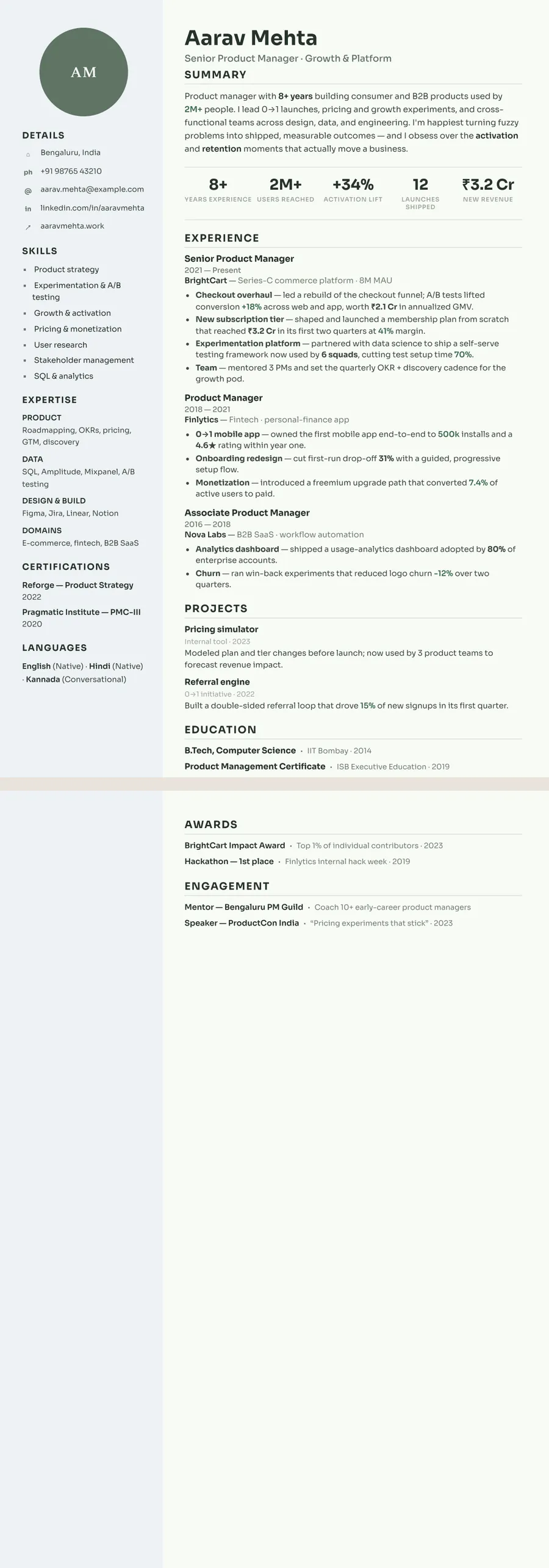
How a photo template works, and what photo to use
A template built for a photo gives it a fixed place and arranges the page around it. On ResumeInk, four layouts support one. Sidebar and Portrait show it in a circle at the top of the side column, with your contact details, education and languages beneath; leave it out and the circle shows your initials instead. Compact header and Timeline put the photo in the header, on a single-column page. Either way it stays aligned and in proportion, unlike a picture pasted into a document.
A good resume photo is simple:
- Head and shoulders, facing the camera and centred, so it crops cleanly into a small frame.
- A plain, light background and soft, even light — no harsh shadows.
- Dressed as you would be for the interview, with a natural expression.
- Recent and sharp — no selfies, group crops, filters or sunglasses.
When to include a photo, country by country
Follow the norm where the job is, not where you live:
- India — common, and expected by some employers, especially in hospitality, aviation and customer-facing roles. Many tech and corporate employers don't need one, so check the job post.
- Much of Europe — widespread in countries such as Germany, Austria, Switzerland, France, Spain and Italy, though optional almost everywhere.
- The Middle East and much of Asia — often expected, including in the Gulf states, China, Japan and South Korea.
- US, UK, Canada and Australia — usually left off. Employers there generally prefer not to see one, partly to avoid any bias based on appearance.
When in doubt, leave it out: a missing photo rarely counts against you, while an unexpected one can distract. If you apply in more than one country, keep two versions. Our CV template guide covers other country differences.
Do photos cause problems with ATS?
An applicant tracking system reads text. It does not read faces, and most parsing software simply skips images. What causes trouble is anything else turned into a picture — a name or contact block saved as an image, or a whole resume exported as a scan — because then the software has nothing to read.
On ResumeInk the photo sits in its own frame and everything else stays real, selectable text in a logical reading order, side column included. Every design is checked to read cleanly in ATS text extraction, and the ATS score in the editor shows how readable your resume is for hiring software.
The bigger question is people, not software. In the US, UK, Canada and Australia, some employers prefer not to receive photos at all, so send those applications without one. And where a photo is expected, a poor one can do more harm than none, so take a few minutes to get it right.
Add a photo to your resume with ResumeInk
Upload your current resume as a PDF, Word file or photo, or start from the sample, then pick one of the four layouts that take a photo:
- Midnight gold Sidebar — a dark, full-height left sidebar in navy and gold, with your photo in a circle at the top, above contact, education and languages.
- Sage botanical Portrait — a light left column with calm green accents, holding the photo circle, your details, skills, certifications and languages.
- Compact header or Timeline — single-column layouts with the photo in the header, for when you want a picture but not a side column. See the Midnight timeline template.
Upload your photo, adjust how it sits, or remove it at any time. Then edit any text, reorder sections and fine-tune fonts and colours. Need a version without a photo for a UK or US application? Switch to a design such as Letterpress classic in one tap — your words stay, with nothing to retype.
With photo designs you can use


Build your resume in minutes
Upload your current resume, edit anything, then preview and download it free.
Upload your resumeFrequently asked questions
Should a resume have a photo?
It depends on the country and the employer. Photos are common in India, much of Europe, the Middle East and Asia, and usually left off in the US, UK, Canada and Australia. If the job post asks for one, include it; if you're unsure, leave it out.
Is a resume with a photo ATS-friendly?
Yes, as long as all your text is real text. Applicant tracking systems skip the image and read the rest; problems only come when the text itself is saved as a picture.
Do Indian employers expect a photo on a CV?
Many are used to seeing one, and some roles and application forms ask for it. Plenty of corporate and tech employers don't need one, so follow the job post; where a photo is expected, a clear, professional one is best.
Can I remove the photo later without redoing my resume?
Yes. On ResumeInk you can upload, adjust or remove the photo at any time, and you can switch to a design without a photo frame in one tap, keeping all your text.