Free Two-Column Resume Template
A two-column resume template splits the page into a narrow side column and a wider main column. Contact details, education, certifications and languages sit to one side, so your experience gets the room it needs. It suits people with plenty of short facts to show, such as tools, languages or credentials, and anyone who wants a resume that looks designed without looking busy. ResumeInk's two-column designs keep real text in a logical reading order, and every one is checked for ATS text extraction.
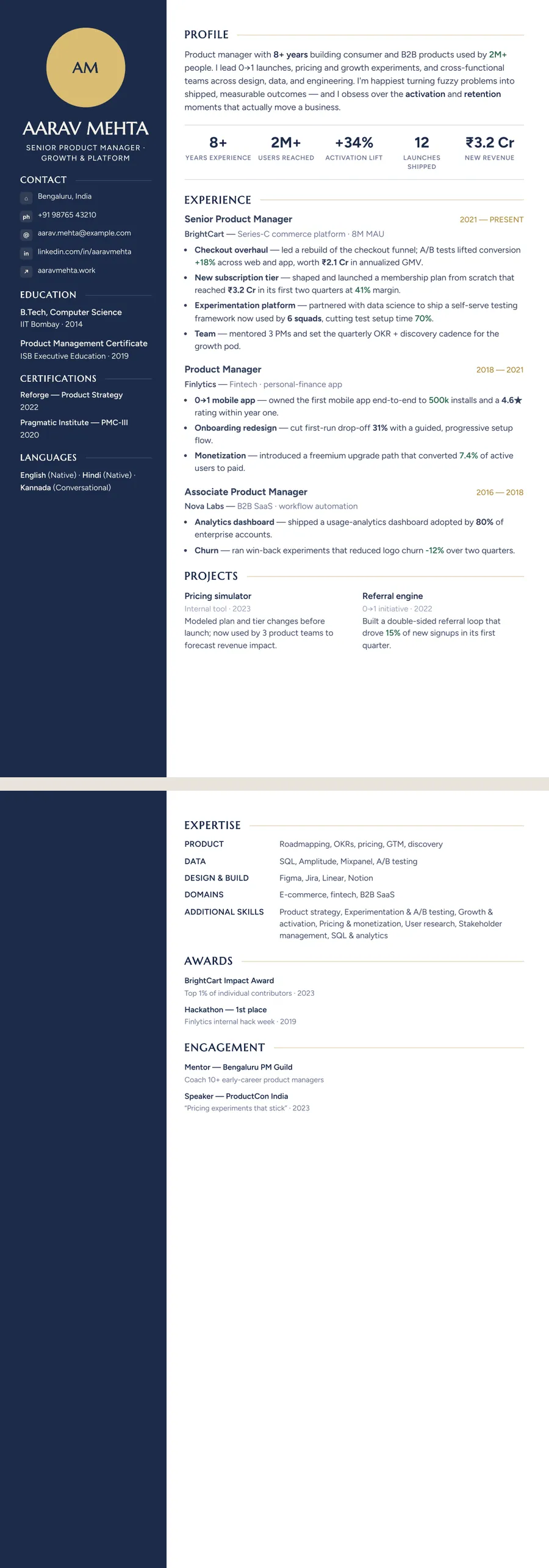
What a two-column resume looks like
A single-column resume reads like a letter: one stream of sections from top to bottom. A 2 column resume works more like a fact sheet with a story beside it. The side column holds the short, scannable items — phone, email, city, degree, certifications, languages. The main column carries the parts that need sentences: your profile, key numbers, experience and projects.
The gain is space. Moving contact details and education out of the main flow lets your latest role start higher on the page, and short lists stop eating whole lines. The trade-off is width. The main column is narrower, so long bullet points wrap more often.
ResumeInk has two kinds of side column. Sidebar runs a full-height panel down the left, dark in themes such as Midnight gold and Slate tech, with a photo or initials circle at the top. Portrait uses a light left column for the photo, your details, skills, certifications and languages. It feels softer and prints with less ink.
Who a two-column layout suits, and when to skip it
Two columns work best when you have lots of short facts that would look thin in a full-width list:
- Engineers and analysts with tools, languages and certifications to list
- Designers, marketers and product people who want the page to show some craft
- Multilingual candidates, since a languages block sits neatly in the side column
- Mid-career professionals whose degree no longer needs prime space
In India, the Middle East and parts of Europe and Asia, a CV with a photo in the side column is common, and many employers expect one. In the US, UK, Canada and Australia, most people leave the photo off, and ResumeInk shows your initials in the circle instead.
Skip two columns if a job portal asks you to paste your resume into a form, if your bullets are long and narrative, or if you are applying to a very conservative employer in law or government. A single-column professional resume template is the safer pick there.
Are two-column resumes ATS-friendly? The honest answer
It depends on how the columns are built. Some older applicant tracking systems read a page strictly left to right, line by line. If a resume is built from tables or floating text boxes, that can stitch a skill from the side column into the middle of a job bullet. That is where the advice against two-column resumes comes from, and it is a fair warning.
ResumeInk's two-column designs avoid the usual traps. Every word is real, selectable text, never part of an image. The side column and the main column each keep a logical reading order, so a parser gets your details and then your experience, not a mix of both. All 260 designs are checked in ATS text extraction.
No one can promise how every system behaves. If you know an employer uses an older system, send a single-column design for that application; your words stay as they are. Our guide on how to make an ATS-friendly resume covers the rest.
Make a two-column resume with ResumeInk
Upload your current resume as a PDF, Word file or photo, up to 20 MB, or start from a sample. The AI reads it and rebuilds it in the design you pick. Good two-column starting points:
- Bordeaux serif Sidebar — wine accents and serif headings on a soft blush panel
- Midnight gold Sidebar — a deep navy panel with gold details
- Slate tech Sidebar — dark slate and teal, made for technical roles
- Sage botanical Portrait — calm green with a light side column
Then click any text to edit it, move sections up or down, or hide the ones you do not need. Add a photo if your market expects one; it sits in a circle at the top of the side column. If two columns ever feel wrong for a job, switch to any other design in one tap and your words come with you. Check the ATS score before you download the PDF.
Two-column designs you can use


Build your resume in minutes
Upload your current resume, edit anything, then preview and download it free.
Upload your resumeFrequently asked questions
Are two-column resumes ATS-friendly?
They can be, when the text is real and the reading order is logical. ResumeInk's two-column designs are checked in ATS text extraction, but some older systems still handle columns poorly, so keep a single-column version for portals that ask you to paste your resume.
Should I put a photo on a two-column resume?
It depends on the country. Photos are common in India and parts of Europe, the Middle East and Asia, but are usually left off in the US, UK, Canada and Australia. In ResumeInk the photo is optional, and your initials fill the circle if you skip it.
What goes in the side column of a resume?
Short, scannable facts: contact details, education, certifications, languages and often skills. Keep your profile, experience and projects in the main column, where there is room for full sentences.
Can I turn my two-column resume into a single-column one?
Yes. In the editor you can switch to any of the 260 designs in one tap, including single-column layouts such as Classic or Compact header, and your text stays the same.