Free Slate Professional Resume Template
Slate Sidebar pairs a cool slate blue-grey palette with a tidy sidebar layout for an understated, corporate look that feels senior without trying too hard. This cool, corporate professional resume template keeps your contact details, skills and education in a calm side column while your experience leads the main column — ideal for finance, consulting, tech and enterprise candidates who want polish over flash. Upload your existing PDF, Word doc or photo and let ResumeInk's AI rebuild it in this design; preview and download it free.
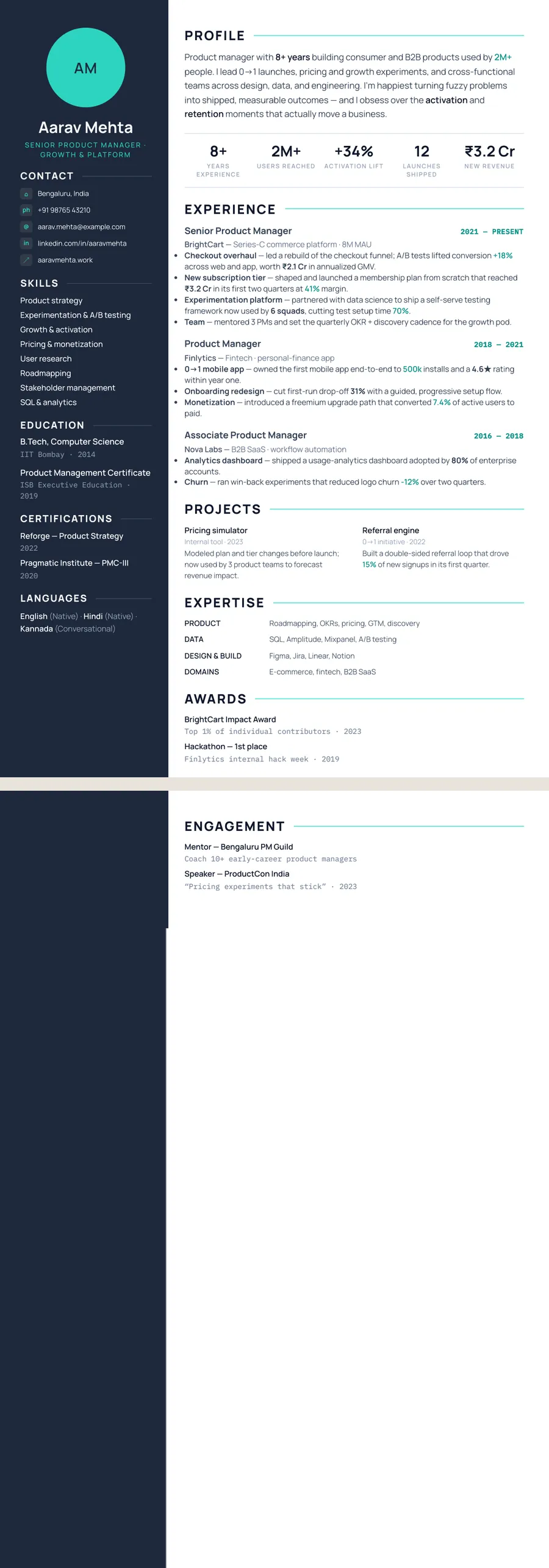
What makes the Slate Sidebar design stand out
Slate Sidebar leads with a cool, blue-grey colour story that reads as calm, senior and corporate rather than loud or trendy. A muted slate sidebar holds your contact details, skills and education, while the wider main column carries your summary and experience — so the eye lands on your impact first and your supporting facts stay tidily to one side. Clean sans-serif type, generous spacing and restrained section rules give it an understated, boardroom-ready polish.
The overall impression is professional and self-assured: it signals that you let your results do the talking. There are no bright accents or decorative flourishes to distract a recruiter — just a confident, modern structure that looks equally at home in finance, tech, consulting and enterprise hiring.
Who it's best for
The cool, corporate tone suits experienced professionals and anyone applying into structured, established organisations where understatement reads as seniority. It works especially well for:
- Corporate and enterprise roles in finance, consulting, operations and legal where a measured, professional look is expected.
- Product managers and program leads who need a clean two-column layout to balance strategy, skills and shipped outcomes.
- Data analysts and analytics professionals who want a calm, scannable structure for tools, metrics and dashboards.
- Sales and account management professionals presenting quota attainment and client results to corporate buyers.
- Managers, directors and mid-to-senior candidates who prefer polish over personality and want to look the part for a step up.
Why it's ATS-friendly
Despite the two-column look, Slate Sidebar is built from real, selectable text with a clear heading hierarchy — not images or graphics — so applicant tracking systems can read every line. The sidebar and main column are laid out so the content still parses as ordinary, readable text in a logical order, with standard section labels like Experience, Skills and Education that ATS parsers expect. The slate colouring is purely visual styling over that clean structure, so your keywords, dates and job titles come through intact when an employer's system scans the file.
The Slate tech typography and colours
Every word on a Slate tech page is set in Manrope, a modern sans with rounded, slightly geometric shapes. Your name is set in bold at the top of the side column, section headings are heavy, letter-spaced capitals, and body text runs in the regular weight. A single family keeps the page calm and technical, a little like a well-made product dashboard, with hierarchy built from weight and size rather than from a second font.
The colours are cool. The side column is a deep slate blue-grey (#1E293B) with light text, the main column is white with near-black navy text, and teal is the accent. It marks the job title under your name and fills the initials circle when you skip a photo, adding one fresh note to an otherwise muted page.
On a black-and-white printer, the dark side column prints as a solid charcoal band with white text. It stays readable but uses a lot of toner. On screen the contrast looks sharp; if you expect to hand in paper copies, a theme with a pale sidebar is kinder to the printer.
How to fill in the Sidebar layout
Two columns share the page in the Sidebar layout: a narrow dark one on the left and a wide main one on the right. The side column starts with a circle at the top: your photo if you add one, or your initials if you don't. Under it come your name, your job title, then contact details, education, certifications and languages.
The main column carries what a recruiter reads first:
- Profile — two to four sentences, around 50 words, naming your speciality and the systems you work on.
- Key numbers — a few headline figures, like uptime, team size or projects delivered.
- Experience — title and dates on one line, company beneath, four to six bullets for recent roles.
- Projects and expertise — named projects, then grouped skills such as "Cloud: AWS, Terraform, Kubernetes".
Example bullet: "Migrated 60 on-premise services to AWS over nine months with no unplanned downtime." Keep to one page for roughly the first eight years of a career. Beyond that, two pages are fine, and the dark column continues down the second page.
Who the Slate tech design suits
Slate tech was made for technical and analytical work. Engineers in software, DevOps, networks and data, along with business analysts and civil or infrastructure engineers, get a design that looks precise without trying to be clever. It works best from a few years of experience upward, because the side column needs education, certifications and languages to fill it; a first-job candidate with little to put there may prefer a single-column design.
The photo circle is optional. Recruiters in the US, UK, Canada and Australia generally expect no photo, and the initials circle fills the space neatly. In India and the Gulf, a professional headshot in that circle is common.
Choose something quieter if the role is in a very traditional sector such as law or the civil service, where a dark panel can feel loud. A single-column layout in the same theme keeps the cool colours with a plainer structure.
See it in use
Slate tech shows up in six role examples on the site, spread across five layouts:
- the business analyst resume example, in the Compact header layout
- the Java developer resume example, in the Developer stack layout
- the DevOps engineer resume example and the network engineer resume example, both in the Stacked layout
- the civil engineer resume example, in the Classic centered layout
- the data engineer resume example, in the Skills-first layout
None of them uses the Sidebar layout shown on this page, which makes them a handy way to see the same colours in other structures. The design also appears among the cool greys on the gray resume templates page. For a softer take on the same Sidebar structure, compare Platinum slate, which swaps the dark column for a pale one.
Moving between any of these takes one tap in the editor: pick a theme or layout and your wording carries straight over.
Premium, ATS-friendly templates


Build your resume in minutes
Upload your current resume, edit anything, then preview and download it free.
Upload your resumeFrequently asked questions
Is the Slate Sidebar template ATS-friendly?
Yes. It uses real selectable text and standard section headings in a logical reading order, so applicant tracking systems parse your skills, dates and titles correctly — the slate sidebar is visual styling on top of a clean, readable structure.
Can I edit or recolour this template?
Yes. After ResumeInk's AI rebuilds your resume into the Slate Sidebar design, you can edit the wording and adjust the look — including the slate blue-grey tone, spacing and text size — before you download.
How do I use the Slate Sidebar design?
Upload your existing resume as a PDF, Word doc or photo and apply the Slate Sidebar design; AI rebuilds it into this layout. Previewing and downloading are both free.
Is the Slate design only for tech jobs?
No. It was shaped for technical work, but the role examples on the site also use it for a business analyst and a civil engineer. Any role where a precise, calm look helps can use it.
What appears in the circle if I don't add a photo?
Your initials. The Sidebar layout shows them in a teal circle above your name in the side column, so the design looks complete without a headshot.