Free Terminal Developer Resume Template
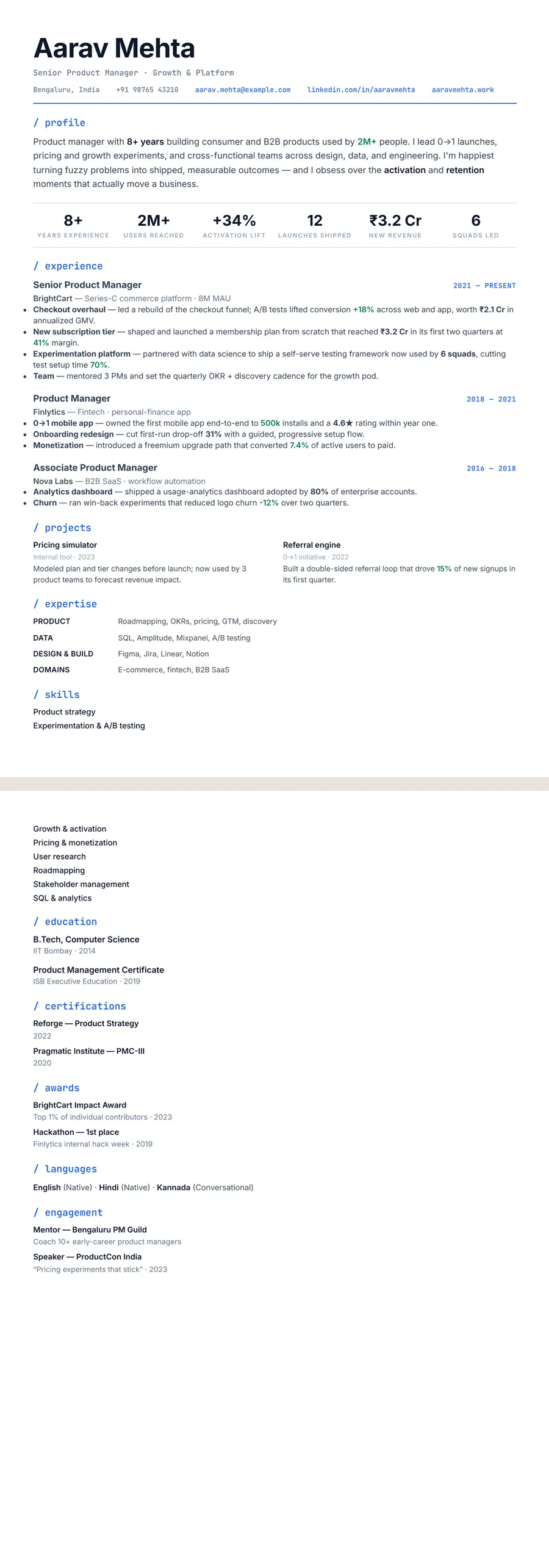
Terminal Devstack is a developer resume template built to look like the tools engineers live in: JetBrains Mono headings, lowercase section labels prefixed with a code-style / marker, and an electric-blue accent over crisp slate text. The whole resume runs as one clean single-column flow with a left-aligned name, a monospace contact line, and dates right-aligned inline next to each role. It suits developers and technical folks who want a resume that reads like well-formatted code rather than a corporate document.
What makes the Terminal Devstack (developer) design stand out
The signature move is the section header: each one is set in monospace, kept lowercase, and led by a / marker in blue — so / experience, / projects, and / skills read like commands or paths instead of headings. Paired with a bold, left-aligned 29pt name and a monospace contact line underlined by a single blue rule, it instantly signals a technical author without resorting to icons or gimmicks.
Underneath the styling it stays disciplined: body copy is Inter for easy reading, role dates sit in a small uppercase monospace tag in the accent colour, and metrics pick up a distinct green so quantified wins jump out. Everything stacks in one full-width column, which keeps long skill stacks and project lists scannable and gives the page a calm, terminal-clean rhythm a recruiter can skim in seconds.
Who it's best for
Terminal Devstack is made for technical resumes where a developer-native aesthetic is an asset rather than a distraction. It fits especially well for:
- Software engineers and full-stack, backend, or frontend developers
- Data scientists and ML engineers with model and pipeline work to show
- Data analysts and analytics engineers who live in SQL and notebooks
- DevOps, platform, SRE, and infrastructure engineers
- Open-source contributors, bootcamp grads, and CS students with strong projects
If your value is your stack, your shipped work, and your GitHub, this design frames all three the way technical reviewers expect to see them.
Why it's ATS-friendly
The terminal styling is purely visual — every part of the resume is real, selectable text in a single readable column, not an image or a multi-column table. The / section markers are just CSS, so applicant tracking systems still parse plain headings like "experience," "projects," and "skills," and the top-to-bottom single-column flow gives parsers an unambiguous reading order. Your contact details, role titles, dates, and bullet points all extract cleanly, so the design passes ATS screening while still looking like a developer made it.
The Terminal developer typography and colours
Terminal developer sets your name and all body text in Inter, a clean sans built for screens, and switches to a monospace face for the details a developer's eye goes to: the title line under your name, the contact line, the dates and every section heading. Those headings are lowercase and begin with a slash, so they read like paths in a file tree: / experience, / projects, / skills.
The palette is a deep slate-navy ink on white with one bright blue accent (#2563EB). Blue marks the section headings, the links in your contact line, the rule under the header, the dates beside each role and a thin bar running down the left of each group of bullets. The effect is close to syntax highlighting, used sparingly.
Printed in black and white, the blue turns mid grey, so the slash headings, dates and rules soften while the navy text stays almost black. The monospace labels still mark each section clearly, which keeps the page easy to scan on paper as well as on screen.
How to fill in the Developer stack layout
Developer stack is a single full-width column designed for engineers. Your name sits flush left above a one-line title and a monospace contact line with room for LinkedIn and a GitHub or portfolio link.
- Profile: two or three lines naming your specialism, your main languages and the scale you work at.
- Experience: role, employer and a short descriptor, with dates aligned right. Write three to five bullets for recent roles, each naming the tool and the measurable result.
- Projects: two to a row, each with a one-line description. Open-source work and side projects belong here.
- Expertise: grouped rows such as Languages, Backend, Cloud and Data. Move this section above experience if your stack is your strongest card.
- Education and certifications: near the end, unless you are still a student.
One page suits most developers; use two if you have a long run of shipped systems. This layout has no photo. A bullet that fits: “Moved nightly batch jobs to event-driven Python workers; report latency fell from 6 hours to 20 minutes.”
Who the Terminal developer design suits
Terminal developer suits anyone whose resume will be read by engineers: backend, frontend and full-stack developers, DevOps and site reliability engineers, data and machine learning engineers, QA automation specialists and security analysts. It fits product companies, start-ups, developer-tool vendors and in-house engineering teams at banks and retailers alike. Students and bootcamp graduates benefit from the prominent projects section, while senior engineers can lean on experience and a row of key numbers.
With no photo slot, it is ready for applications in the US, UK, Canada and Australia, where photos are usually left off. For India or the Gulf, where a photo is more common, keep the theme and switch to the Sidebar or Compact header layout.
Choose something quieter for engineering management, solution architecture or consulting roles aimed at business stakeholders, and for non-software engineering such as civil or mechanical work, where code styling can look out of place. A plain single-column theme reads as more neutral there.
See it in use
The Python developer resume example uses Terminal developer in this same Developer stack layout, so it is the best place to see the theme filled with real engineering content: a stack-led profile, quantified bullets and a projects row. Its bullets follow the pattern this layout rewards: a tool, an action and a measured result in one line. The design would also suit the software engineer resume example, which uses a different design on the site.
On the blue resume templates page, Terminal developer sits alongside the other blue designs. For more layouts aimed at engineers, browse the developer resume templates, and if you want a cooler, less code-flavoured look, the Slate professional design is a good neighbour. Switching is one tap: choose another theme or layout and your text stays exactly where it was, so you can test a calmer look for a less technical application without rewriting anything.
Premium, ATS-friendly templates


Build your resume in minutes
Upload your current resume, edit anything, then preview and download it free.
Upload your resumeFrequently asked questions
Is the Terminal Devstack template ATS-friendly?
Yes. Despite the monospace, code-style look, it's all real selectable text in a single-column flow, so applicant tracking systems read your sections, skills, and experience without trouble.
Can I edit or recolour this template?
Yes. You can edit every section in ResumeInk's live editor and adjust the design — the default electric-blue accent, text size, and spacing are all tunable before you download.
How do I use the Terminal Devstack design?
Upload your existing resume (PDF, Word, or even a photo) and AI rebuilds it in this design. It's free to preview and to download.
Should I put my GitHub link on a developer resume?
Yes, as long as the repositories it leads to are tidy and reasonably recent. Add it to the contact line beside LinkedIn, and name the projects worth opening in your projects section so a reviewer knows where to look.
Will non-technical recruiters take a code-style resume seriously?
In most cases, yes, because the styling is limited to headings, dates and the contact line, and the bullets read as normal sentences. If the first reader is likely to be an HR generalist at a traditional company, a plainer theme is the safer choice.