Free Sage Skills-First Resume Template
The Sage skills-first resume template swaps the usual stark palette for a calm, soft sage green, pairing an elegant serif heading with clean sans-serif body text. Its signature is a skills and expertise block placed right at the top, so recruiters see what you can do before they read where you have worked. It suits anyone who wants an understated, professional look that leads with capability — engineers, analysts, designers, and career changers alike.
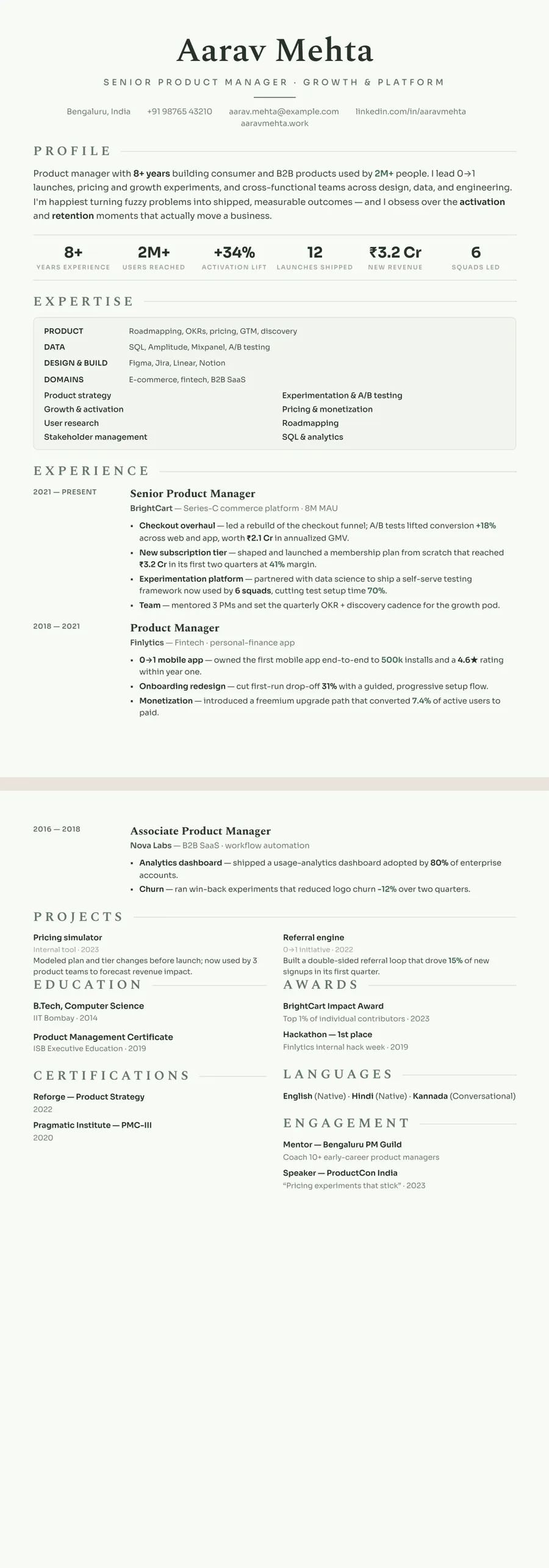
What makes the Sage Skills-first design stand out
Sage trades the usual hard navy-and-black palette for a soft, restful sage green. Headings sit in a refined Spectral serif while the body runs in clean Sora sans, and the whole page rests on a faint sage-tinted paper background with muted eucalyptus rules between sections. The effect is calm and considered rather than loud — it reads like someone who is organised and self-assured, not someone shouting for attention.
The defining move is structural: a skills and expertise block sits right at the top, directly under your name. Before a recruiter scrolls into job history, they see exactly what you do best — your core competencies surfaced first, with subtle proficiency cues. It is a single-column flow, so nothing competes for the eye; the skills lead, the experience follows, and the soft green accents tie it together without ever overpowering the text.
Who it's best for
Sage suits people whose strongest pitch is their toolkit and capabilities — where leading with skills lands harder than leading with a job title. The calm, skills-first layout works especially well for:
- Software engineers who want their stack and languages front and centre
- Data scientists and data analysts with a broad methods-and-tools profile
- Career changers who want transferable skills to read before a non-linear job history
- UX, design, and research roles where a calm, polished aesthetic signals taste
- Anyone who prefers an understated, professional look over a bold or colourful one
Why it's ATS-friendly
Under the soft styling, Sage is just real, selectable text in a single readable column — there are no images of words, text boxes, or multi-column tricks that confuse parsers. Because the skills block sits at the top of a single-column flow, an applicant tracking system reads your name, then your skills, then your experience in the exact order a human would, so keywords and section headings are picked up cleanly. The sage green is colour, not content, so nothing meaningful is lost when the resume is parsed into plain text.
The Sage botanical typography and colours
Sage botanical sets headings in Spectral, a slim, bookish serif, and the body in Sora, a geometric sans with open, rounded letter shapes. The mix is gentle: the serif gives your name and role titles some warmth, while Sora keeps long skill lists and bullets easy on the eye. Line spacing is generous, which adds to the unhurried mood.
Everything is tinted green. The page itself is a very pale green-white, the text is a deep green-black rather than pure black, and the accent is a muted grey-green (#5F7464) used for the wide-tracked section headings and the target title under your name. A soft sage wash fills the shaded Expertise panel, so the skills block reads as one calm unit before the experience begins.
In black and white the greens fall into soft greys. Headings stay readable but recede a step, the pale page tint turns near-white, and the dark body text keeps its contrast. On a mono printer the panel behind your skills may show as a faint grey box, which still frames the section neatly.
How to fill in the Skills-first layout
Skills-first places a shaded Expertise block before your experience, so the page runs: header, profile, expertise, then roles. That order is the whole point of the layout, so give the expertise block the most care.
- Header: a centred name, a target title and one contact line. This layout has no photo.
- Profile: two or three sentences naming the skills you want to be hired for and one result that proves them.
- Expertise: three or four labelled groups with four to six items each. A short list of strengths can sit below the groups in two neat columns.
- Experience: dates in a left column, titles in the serif, then bullets that show those grouped skills in action.
- Education and extras: education, certifications and languages close the page, side by side.
One page is right for most people in this layout; go to two only with well over ten years of experience. An expertise line that works: “Inventory planning: demand forecasting, safety stock, SAP IBP, supplier scorecards.”
Who the Sage botanical design suits
Sage is for people whose skills tell a clearer story than their job titles. That includes career changers, returners after a break, people with several short contracts, and specialists in operations, supply chain, healthcare, pharmacy, sustainability, research and education. The calm green palette sits naturally in wellness, environmental and public-health settings, and the serif-and-sans pairing keeps it grown-up enough for corporate roles too. It helps most from early to mid career, when a strong toolkit matters more than a long list of employers.
The Skills-first layout has no photo slot, which suits applications in the US, UK, Canada and Australia, where employers generally expect no photo. For India or the Gulf, keep Sage and switch to a photo layout such as Sidebar or Timeline.
If your history is a steady climb in one field, leading with skills can bury your best evidence, and a chronological layout serves you better. For strict legal or banking settings, a black or navy theme is the quieter choice.
See it in use
Sage botanical appears in two role examples on the site, and neither uses Skills-first, which shows how well the palette travels:
- The supply chain manager resume example uses Sage in the Sidebar layout, with contact, education and certifications in the side column.
- The pharmacist resume example uses Sage in the Classic centered layout, a single column with dates on the left.
Seeing the theme on a pharmacy CV and an operations CV is a good test of whether the green suits your own field.
The green resume templates page shows Sage beside the other green designs. If the skills-led structure is what drew you here, the skills-based resume templates cover that format in more depth, and the Slate professional design offers a cooler blue-grey take for technical roles. In the editor a single tap changes the theme or layout; your text stays exactly as you wrote it, so moving between Sage and any of these takes seconds.
Premium, ATS-friendly templates


Build your resume in minutes
Upload your current resume, edit anything, then preview and download it free.
Upload your resumeFrequently asked questions
Is the Sage Skills-first template ATS-friendly?
Yes. It is a single-column layout of real, selectable text, so applicant tracking systems read your skills and experience in order — the sage green is purely visual and never blocks parsing.
Can I edit and recolour this template?
Yes. You can edit any wording, reorder sections, and switch designs or accent tones for free in the preview before you decide to download.
How do I use the Sage design?
Upload your current resume as a PDF, Word file, or photo, and ResumeInk's AI rebuilds it into the Sage Skills-first layout. Previewing is free, and so is downloading.
Is a skills-first resume the same as a functional resume?
Not quite. A functional resume often drops or hides dates, while this Skills-first layout puts grouped skills first and still lists every role with its dates underneath, which keeps your history easy to check.
How many skills should go in the Sage Expertise block?
Three or four labelled groups with four to six items each is a good range. Choose skills that appear in the job description and that your experience bullets can back up.