Free Dune Warm Modern Resume Template
Dune is a warm modern resume template built around earthy cream and a confident terracotta accent, pairing an elegant centred serif header with clean, easy-to-read body type. It feels modern and approachable rather than corporate and cold — ideal for marketing, sales, product, and people-facing professionals who want personality without sacrificing polish. Free to preview and to download.
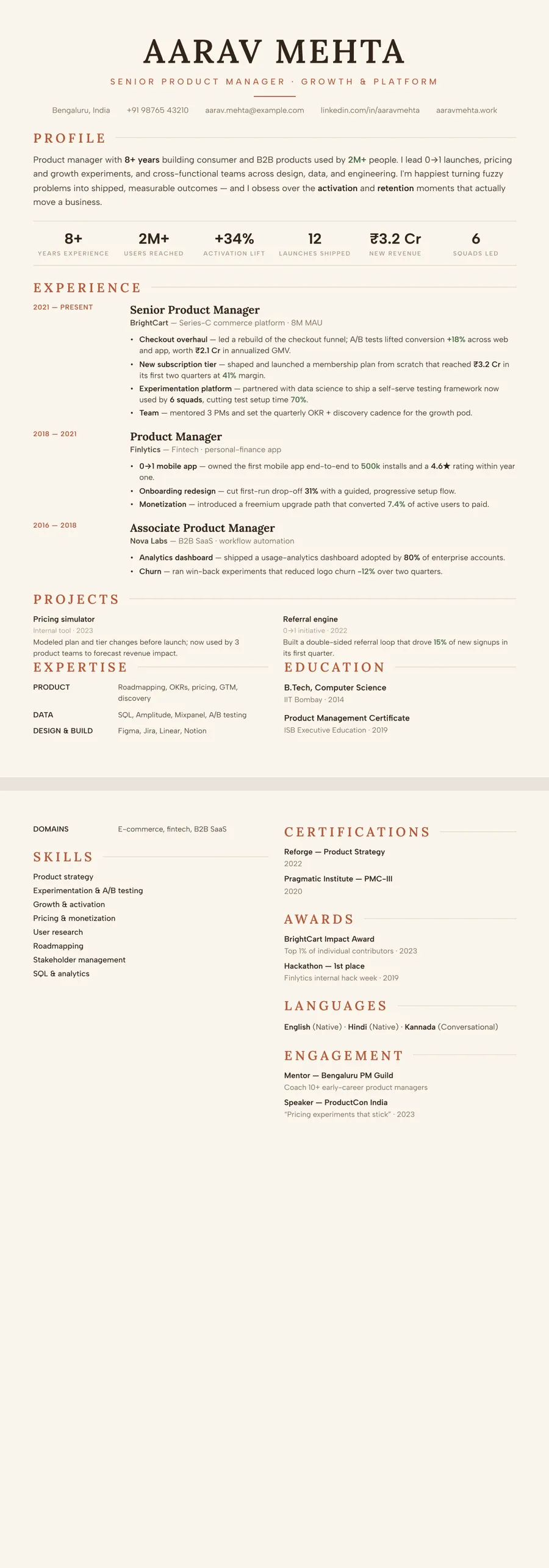
What makes the Dune Classic centered design stand out
Dune trades cold corporate white for a soft, sun-bleached cream page and a confident terracotta accent — the colour of warm clay and desert light. Your name sits centred at the top in a graceful Lora serif, with section headings underlined by a thin warm rule, while the body runs in clean Albert Sans for effortless reading. The centred header gives the whole resume a calm, balanced symmetry rather than the off-to-one-side feel of column layouts.
The result reads as modern and human: polished enough for a serious application, but warm and approachable instead of clinical. The terracotta is used sparingly — on your name, headings, and small details — so the page feels designed and intentional without ever shouting over your experience.
Who it's best for
Dune suits people who want to feel personable and creative while staying unmistakably professional. The warm palette and centred classic layout work especially well for client-facing, brand, and people-oriented roles.
- Marketing and brand professionals who want personality without losing polish
- Sales and business-development roles where warmth and approachability matter
- Product managers bridging design, business, and engineering teams
- Designers, content, HR, and communications professionals
- Anyone who finds standard blue-and-white templates too cold or generic
Why it's ATS-friendly
The warm colours and serif name are purely visual — underneath, Dune is built from real, selectable text in a single readable top-to-bottom flow, not images or hidden tables. The centred header still parses as plain text, and every section (experience, skills, education) appears as a clean, ordered column that an applicant tracking system can read in the right order, so your details land in the right fields rather than getting scrambled or skipped.
The Dune terracotta typography and colours
Dune pairs Lora, a contemporary serif with soft, brush-like curves, for your name and section headings, with Albert Sans, a clean geometric sans, for everything you read in detail. Your name sits in capitals in Lora, which gives the centred header a bookish, grounded look, while Albert Sans keeps bullets and dates plain and quick to scan.
The colours come from earth and clay. The page is a warm cream rather than white, the text is a deep brown instead of black, and the accent is a terracotta (#B4593A) that colours your section headings, the subtitle, the thin line below your name and the dates beside each role. Together they make the resume look warm and handmade without becoming loud.
In black and white, the brown text prints as a solid dark grey, the terracotta headings become a medium grey and the cream background all but disappears. The page loses its warmth on paper but stays clear and orderly, with every heading still easy to find.
How to fill in the Classic centered layout
Classic centered is a single-column layout with a centred header: your name across the top, a short subtitle such as "Brand and Content Lead", a thin rule, then one line of contact details. This layout has no photo slot, which keeps the header clean.
- Profile — aim for about 60 words across three sentences. Say what kind of work you do, the audiences or markets you know, and one result you are proud of.
- Experience — dates and location sit in a narrow column to the left of each role, with the title, company and bullets to the right. Give your latest job four or five bullets and older ones two or three.
- Expertise and skills — near the bottom, as labelled rows like "Channels: Instagram, YouTube, email".
- Education and certifications — at the foot, often sitting beside the expertise rows.
Example line: "Relaunched the brand's Instagram with a weekly reel series, lifting saves per post from 40 to 310 in six months." Hold it to one page while your experience is under eight years or so; two pages are fine after that.
Who the Dune terracotta design suits
Dune suits people whose work involves taste, warmth or customers: marketing and social media, retail and hospitality, events, HR and people teams, and small creative studios. It reads as approachable, which helps when the job is about winning trust face to face. It fits most career stages, from a second job to a team lead, because the single column carries a short history as comfortably as a long one.
Since Classic centered has no photo slot, Dune in this layout fits markets where photos are usually left off, such as the US, UK, Canada and Australia. Candidates in India or the Gulf who want a headshot can keep these colours and move to a layout with a photo circle, such as Sidebar or Timeline.
Pick a cooler, quieter design for banking, law, audit or public-sector roles, where cream paper and terracotta headings may read as too informal. A white page with navy or grey accents is the safer choice there.
See it in use
Three role examples on the site wear the Dune colours, each in a different layout from this page. The digital marketing resume example sets Dune in the Sidebar layout, where the side column turns a light sand colour. The social media manager resume example uses it in the Timeline layout, and the retail sales associate resume example shows it in the Compact header layout, packed onto one page.
Dune also appears on the brown resume templates page alongside other earthy designs. If you like the cream page but want a wine-red accent and a more traditional serif, compare the Letterpress classic design; for more designs with a refined serif feel, browse the elegant resume templates.
Trying a different look takes one tap: select any other theme or layout and every line you wrote moves across with it.
Premium, ATS-friendly templates


Build your resume in minutes
Upload your current resume, edit anything, then preview and download it free.
Upload your resumeFrequently asked questions
Is the Dune template ATS-friendly?
Yes. Despite the warm cream-and-terracotta styling, Dune uses real selectable text in a single readable column, so applicant tracking systems parse your experience and skills correctly.
Can I edit or recolour this template?
Yes. After the AI rebuilds your resume into Dune you can edit any wording, reorder sections, and fine-tune the look, and you can switch to a different design at any time for free.
How do I use the Dune design?
Upload your existing resume (PDF, Word, or even a photo) and apply the Dune design — the AI rebuilds it for you. It's free to preview and to download.
Does the Dune design have space for a photo?
Not in the Classic centered layout shown here, which has no photo slot. Keep the Dune colours and move to one of the layouts that hold a photo, such as Timeline, Sidebar, Portrait or Compact header.
Will the cream background look odd when printed?
No. The cream is very pale, so on paper it reads as an off-white, and the dark brown text keeps strong contrast. On screen, the PDF shows the warm tone as intended.