Free Administrative Assistant Resume Template & Examples
An administrative assistant resume has to show the qualities the job needs: organised, accurate, discreet and quick with software. That means a tidy page with no errors, the scale of the work you handle, and the tools you use every day. This page covers administrative assistants, office administrators, receptionists, personal assistants and executive assistants, with summary and bullet examples, skills and keywords. Upload your current resume as a PDF, Word file or photo, and ResumeInk rebuilds it in a polished design you can edit directly.
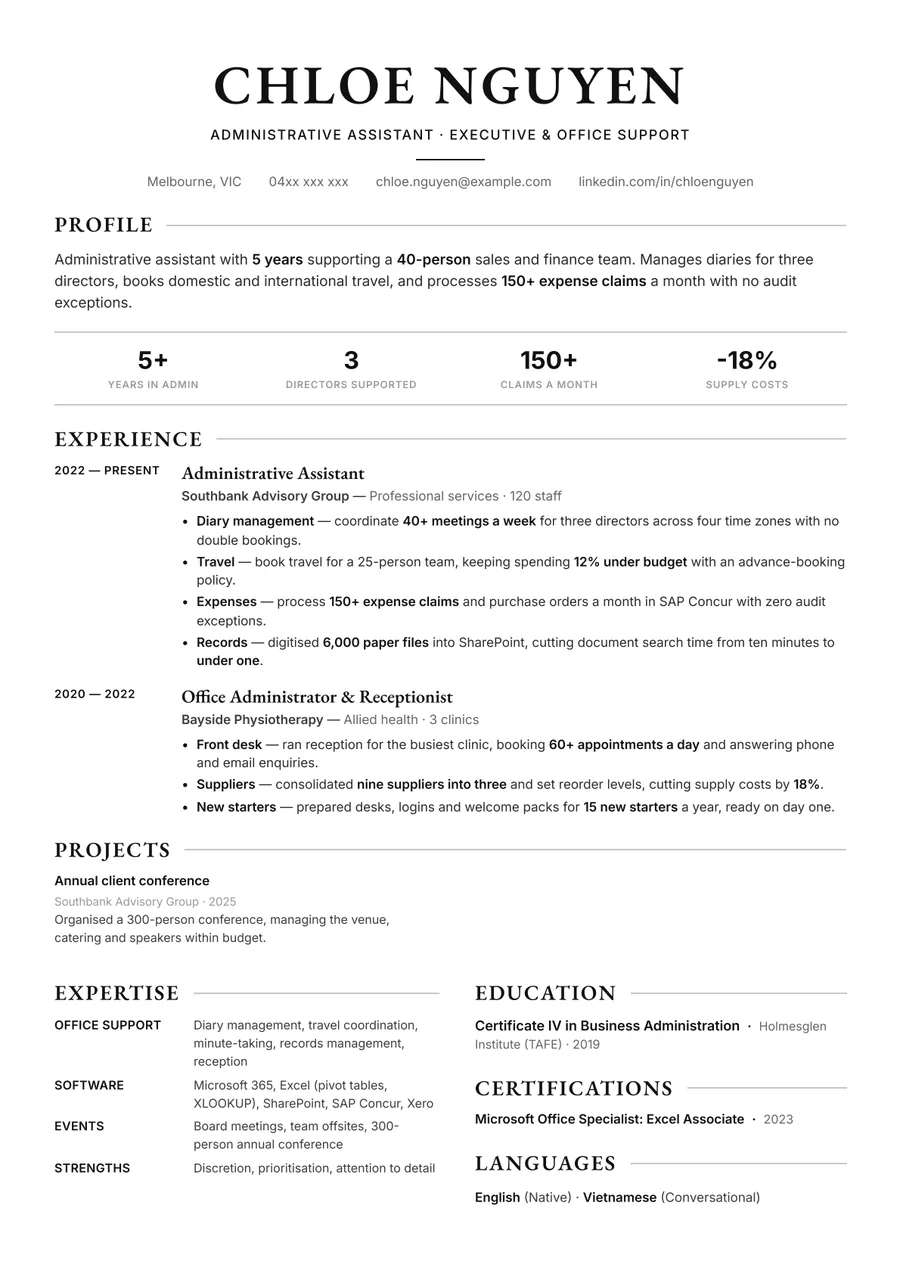
Best resume format for an administrative assistant
One page fits most administrative and office roles. Executive assistants supporting C-level leaders, or office managers with ten or more years, can use two pages if the second page holds real substance.
Use reverse-chronological order: summary, key skills, experience, then education and certifications. Under each role, say who you supported (one director, a team of 25, an office of 120) and what you were trusted with: diaries, travel, budgets, records or events.
The layout is part of your application. Readers judge your attention to detail by how neatly the page is aligned and spaced, so choose a clean simple resume template or a classic professional design, keep fonts consistent and proofread every line twice. In ResumeInk you can switch designs in one tap without retyping, so try two or three and keep the one that reads most clearly.
What to include in an administrative assistant resume
- Summary: years of experience, the level of people you support and two or three strengths, such as diary management, events or records.
- Experience: organisation, role, dates and bullets with volume: meetings scheduled, trips booked, invoices or expense claims processed, visitors received.
- Software: Microsoft 365 (Outlook, Word, Excel, PowerPoint, Teams), Google Workspace, SharePoint, an expense tool such as SAP Concur, and any finance or CRM system you know. Name your Excel skills, such as pivot tables or XLOOKUP.
- Certifications, where you have them: Microsoft Office Specialist (MOS); the Certified Administrative Professional (CAP) in the US; a TAFE Certificate III or IV in business administration in Australia; Tally or computer courses for office roles in India.
- Education: your highest qualification and relevant short courses.
- Extras: languages, typing speed if the job asks for it, and minute-taking or shorthand.
Administrative assistant resume summary examples
Say who you support, at what scale, and what you handle best:
- Entry level: Business administration graduate with front-desk experience from a part-time job at a busy dental clinic, booking 60+ appointments a day and answering patient queries by phone and email. Types 60 words per minute; at home in Microsoft 365 and Google Workspace.
- Mid-level: Administrative assistant with five years supporting a 40-person sales and finance team. Runs calendars for three directors, books domestic and international travel, and processes 150+ expense claims a month with no audit exceptions.
- Senior: Executive assistant to a CEO and board with 12 years in professional services. Manages a complex diary across four time zones, prepares board papers, organises leadership offsites and leads an office team of four.
Administrative assistant resume bullet point examples
- Managed calendars for three directors, coordinating 40+ meetings a week across four time zones with no double bookings.
- Booked travel for a 25-person team and kept travel spending 12% under budget by introducing an advance-booking policy.
- Cut office supply costs by 18% by consolidating nine suppliers into three and setting reorder levels.
- Digitised 6,000 paper files into SharePoint with a clear naming system, cutting the time to find a document from about ten minutes to under one.
- Processed 150+ expense claims and purchase orders a month in SAP Concur with zero audit exceptions.
- Took and circulated minutes for monthly board meetings within 48 hours and tracked every action to completion.
- Organised a 300-person annual conference, managing the venue, catering and speakers within budget.
- Prepared desks, IT access and welcome packs for 40 new starters a year, so each was ready to work on day one.
Numbers make routine work visible: how many people, meetings, files or claims, and what improved.
Skills & ATS keywords for administrative assistant resumes
- Core skills: calendar or diary management, travel coordination, meeting and event planning, minute-taking, records management, data entry, document preparation, reception and front desk, office management, supplier management, purchase orders, expense reports.
- Software: Microsoft 365, Excel (pivot tables, XLOOKUP), Word mail merge, Google Workspace, SharePoint, Zoom, SAP Concur, Xero or QuickBooks, Tally, Asana or Trello, DocuSign.
- Finance and records: invoice processing, petty cash, filing systems, document control, privacy and data protection.
- Soft skills: organisation, discretion with confidential information, attention to detail, prioritisation, clear written communication, a calm and helpful manner.
Wording differs by country: UK and Australian ads say diary management and organised, US ads say calendar management and organized. Use the version in the ad you are answering. For designs that hiring software reads cleanly, see our ATS-friendly resume templates.
Common administrative assistant resume mistakes
- Typos and uneven formatting. In a role built on accuracy, one error undermines the whole page. Read it aloud and check that dates, bullets and spacing line up.
- Handled various office tasks. Vague lines hide your value. Name the task, the volume and the result.
- Underselling who you support. Supporting a managing director or a 40-person team signals trust. Say so.
- Microsoft Office and nothing else. Say what you can do in it: pivot tables, mail merge, templates, shared calendars.
- Confidential details. Describe the kind of work, never private information about the people or company you supported.
- The wrong title. Admin assistant, office administrator, PA and executive assistant are searched separately, so match the ad.
- Hiding a promotion. If you moved from receptionist to office manager at one employer, show both titles with their dates.
Premium, ATS-friendly templates


Build your resume in minutes
Upload your current resume, edit anything, then preview and download it free.
Upload your resumeFrequently asked questions
What is the difference between an administrative assistant and an executive assistant resume?
An administrative assistant resume shows support for a team or office: scheduling, records, supplies and reception. An executive assistant resume centres on one or two senior leaders: complex diaries, board papers, confidential correspondence and acting on their behalf. Write for the level you are applying to.
How do I write an administrative assistant resume with no experience?
Show organised work from anywhere: a front desk in a part-time job, running events for a club, keeping records for a family business or volunteering. Add your software skills, typing speed and any short course, such as Microsoft Office Specialist, and keep it to one tidy page.
Should I put my typing speed on my resume?
Yes, if the job involves data entry, transcription or reception, or the ad mentions it. Give a words-per-minute figure you can match if tested, and leave it off senior executive assistant resumes.
What skills should an admin assistant put on a resume?
Pair core tasks such as calendar management, travel booking, minute-taking and records with named software like Outlook, Excel and SharePoint, plus two or three soft skills you can back up, such as discretion and prioritisation. Mirror the wording of the job ad.