Free Ivory Editorial Resume Template
Ivory is a clean editorial resume template built around warm cream paper and refined Cormorant Garamond serif headings, with a centered masthead that reads like the cover of a print magazine. The soft taupe accents and crisp Inter body text give it a quiet, considered confidence rather than corporate gloss. It suits people who want their resume to feel polished and editorial without ever looking loud or over-designed.
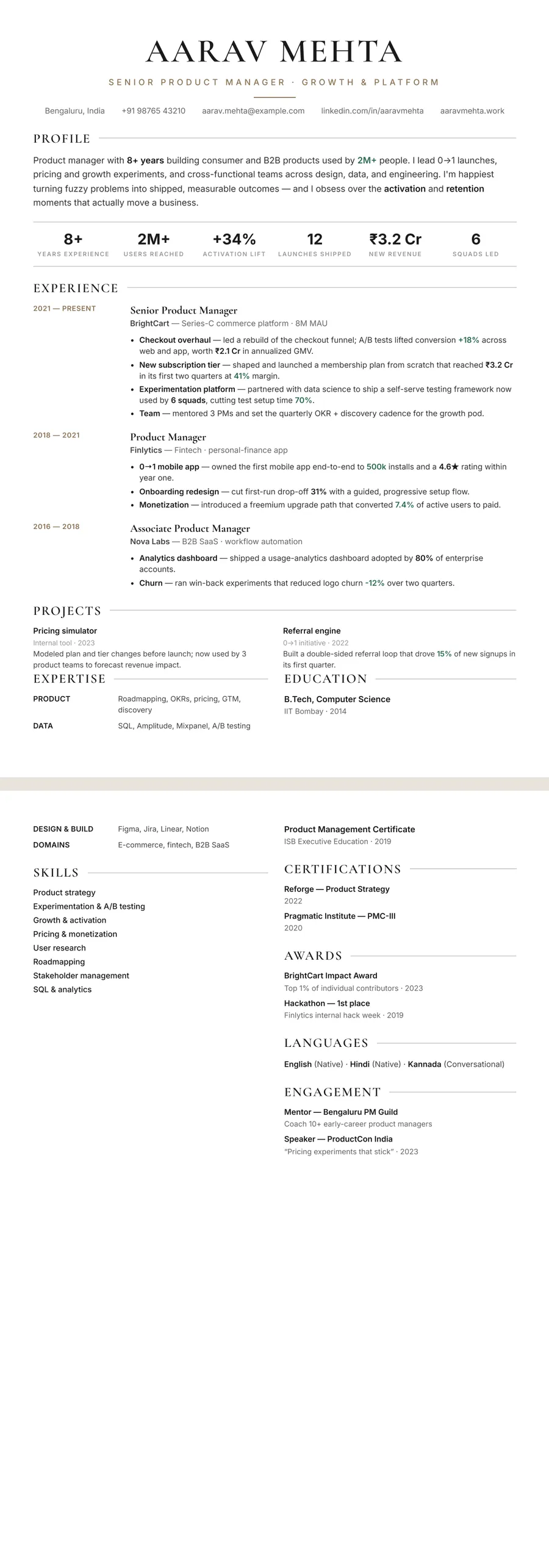
What makes the Ivory Classic centered design stand out
Ivory leads with a centered masthead — your name set in an elegant Cormorant Garamond serif above a thin rule, framed by generous white space so the whole header breathes. Against the warm cream paper, the refined serif headings and clean Inter body text create the contrast you'd expect from a well-set print page rather than a templated form.
The restrained taupe accent and hairline rules guide the eye down the page without ever competing with your words. The result is a resume that feels editorial and intentional: calm, premium, and easy to read at a glance, while leaving your experience as the loudest thing on the page.
Who it's best for
Ivory's understated, editorial polish flatters roles where taste and clarity matter as much as the resume itself:
- Product managers who want a refined, narrative-friendly layout
- Marketing and brand professionals who appreciate considered typography
- Designers, writers, editors, and other creative-leaning candidates
- Consultants, founders, and senior individual contributors presenting a track record
- Data analysts and researchers who want a clean, serious finish
Why it's ATS-friendly
Despite its editorial styling, Ivory is built on real, selectable text and a single top-to-bottom column flow — not images or text boxes — so applicant tracking systems read it cleanly. Your name, standard section headings (Experience, Education, Skills), dates, and bullet points sit in a parseable order, meaning the cream paper and serif headings are purely visual polish that never gets in the way of the parser reading your experience.
The Ivory editorial typography and colours
Ivory pairs Cormorant Garamond for headings with Inter for the body. Cormorant is a high-contrast display serif with long, fine strokes, so your name, set in capitals, and each section heading look like the masthead of a printed magazine. Inter does the opposite job: it keeps bullets, dates and contact details plain and easy to read at small sizes, so the page never turns precious.
The colours are warm and quiet. Text is a soft black on a white page, and the accent is a muted taupe-bronze (#8B7355) used for your target title under the name, the small rule that sits below that title, and the date column of every role. Hairline grey rules run out from each section heading, giving the page an editorial rhythm without boxes or fills. A pale cream from the same palette fills the side column if you move to the Sidebar layout.
Printed in black and white, the taupe becomes a light-to-mid grey. Dates and the title line soften a little, while the serif headings and body text, already close to black, stay crisp and fully legible.
How to fill in the Classic centered layout
In the Ivory theme, Classic centered opens with a centred masthead: your name in capitals, your target title in spaced taupe letters, then a single line of contact details. Everything below runs in one column.
- Profile: two or three sentences. Lead with your field and years of experience, then the kind of problem you are trusted to solve.
- Experience: dates sit in a narrow left column; the role title, set in the serif, and the employer line sit to the right, followed by three to five bullets.
- Expertise: grouped skills, each row with a small label on the left.
- Education, certifications, languages: these pair up side by side towards the foot of the page.
One page suits most people with under a decade of experience; two pages are fine for senior roles with a longer story to tell. There is no photo slot. A profile line in keeping with the design: “HR business partner with eight years in retail and logistics, known for cutting time-to-hire without lowering the bar.”
Who the Ivory editorial design suits
Ivory suits people whose work involves taste, words or people: HR and talent teams, communications, publishing, product marketing, hospitality, interiors and boutique consulting. It looks at home in an established company as much as in a studio, because the serif headings read as cultured rather than flashy. It shows best with a mid-career or senior record, since the generous spacing rewards a well-edited story; a student with one internship may find the page looks sparse.
With no photo slot, Ivory is a safe default for the US, UK, Canada and Australia, where a photo is usually left off. For India or the Gulf, where photos are common, keep Ivory and move to the Sidebar or Portrait layout to show one in a circle.
Choose a plainer design for highly technical roles, where an all-sans page looks more native, or for a very traditional employer that expects a conventional serif CV. The Letterpress white design is the more formal cousin.
See it in use
Ivory editorial is used in two role examples on the site, one in the layout shown here and one in a different layout:
- The human resources resume example uses Ivory in this same Classic centered layout, so it is the nearest thing to a filled-in version of this page.
- The product marketing manager resume example uses Ivory in the Timeline layout, with each role hung on a vertical line of dots.
Both examples are full pages, so they also show how much text the design comfortably carries.
Ivory also appears on the beige resume templates and brown resume templates pages, next to other warm-toned designs. If you like the serif-and-space look but want more range, the elegant resume templates collect similar designs. Each of them is a single tap away in the editor: switch the theme or the layout and your text carries over untouched, so you can try Ivory against an alternative before you decide.
Premium, ATS-friendly templates


Build your resume in minutes
Upload your current resume, edit anything, then preview and download it free.
Upload your resumeFrequently asked questions
Is the Ivory template ATS-friendly?
Yes. Ivory uses real, selectable text and a clean single-column flow with standard section headings, so applicant tracking systems can parse your experience, skills, and dates correctly.
Can I edit or recolour this template?
Yes. After the AI rebuilds your resume in Ivory you can edit any wording, reorder sections, and switch designs or themes in the editor — all free while you preview.
How do I use the Ivory design?
Upload your existing PDF, Word doc, or a photo of your resume and apply the Ivory design; the AI rebuilds it in this style. Previewing and downloading are both free.
Does the Ivory design work for a two-page resume?
Yes. The single column flows naturally onto a second page, so senior candidates can use two pages without the layout breaking apart. Keep the most recent and relevant roles on page one.
Is Ivory editorial too decorative for a corporate job?
Usually not. The decoration is limited to a serif for headings and a muted taupe accent, while the body stays a plain sans. For very conservative employers, a black-only theme is the safer pick.